
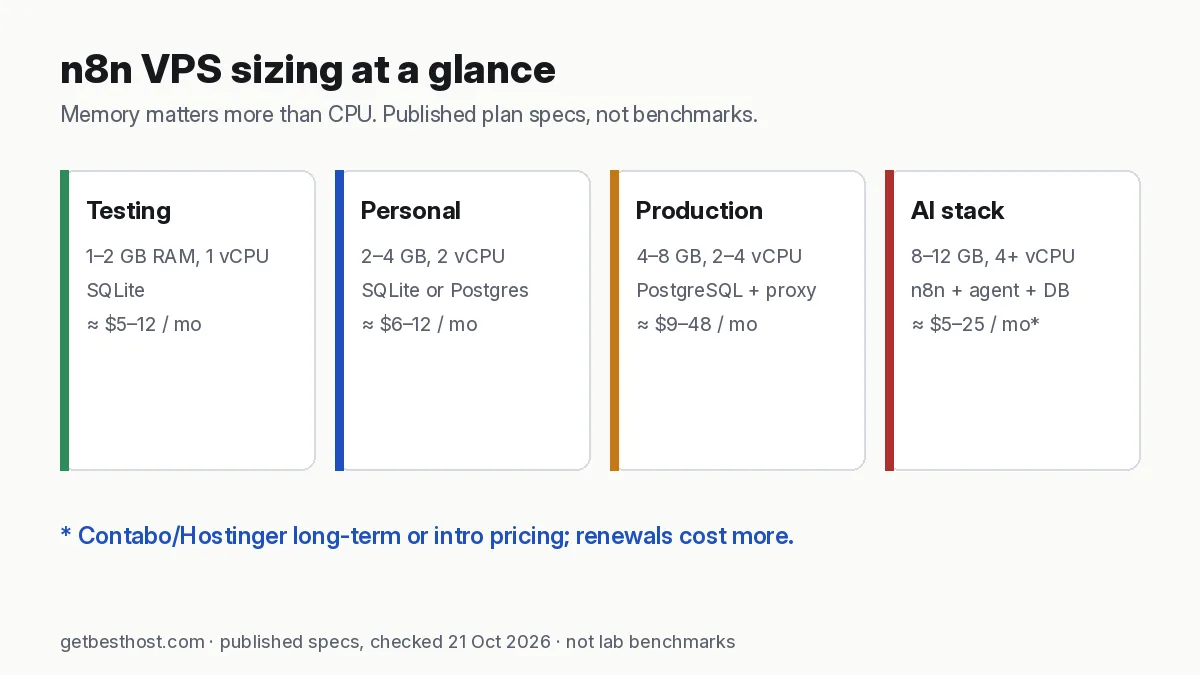
Quick answer: n8n itself is light: its docs put an idle cloud instance at around 100 MB and say memory matters more than CPU. In practice, plan 2 GB RAM / 1–2 vCPU for personal use with SQLite, 4 GB / 2 vCPU for production with PostgreSQL and webhooks, and 8 GB / 4 vCPU if you run AI agent nodes, big files, many parallel executions or other apps on the same server. Good fits are Hetzner CX23 (4 GB), Hostinger KVM 2 (8 GB, n8n template) and Contabo Cloud VPS 4 (8 GB).
What the official n8n docs say
n8n's hosting docs give illustrative sizing based on n8n Cloud: 320 MB to 2 GB of memory, 512 MB to 4 GB of database storage, and minimal CPU. The docs say n8n "isn't CPU intensive" and that memory requirements usually supersede CPU. An idle n8n Cloud instance uses around 100 MB.
What raises memory is your workflows: big JSON responses, binary files (PDFs, images), the Code node (which copies data before and after it runs), manual test runs in the editor, and many executions at once.
Practical sizing tiers
| Use | RAM / vCPU | Database | Example plans (21 Oct 2026 list prices) |
|---|---|---|---|
| Trying n8n, a few workflows | 1–2 GB / 1 | SQLite | Vultr $10 (2 GB), DigitalOcean $12 (2 GB) |
| Personal automation, daily schedules | 2–4 GB / 2 | SQLite or Postgres | Hetzner CX23 (4 GB, €5.99), Hostinger KVM 1 (4 GB, $6.49 intro) |
| Production, webhooks, team use | 4–8 GB / 2–4 | PostgreSQL | Hostinger KVM 2 (8 GB, $8.79 intro), DigitalOcean $24–48 |
| AI agents + n8n + Postgres + proxy | 8–12 GB / 4+ | PostgreSQL | Contabo Cloud VPS 4/6 (8–12 GB, from €4.40–6.00) |
| High volume | Queue mode, workers + Redis | PostgreSQL | Multiple servers |
Prices are published list prices, not benchmarks. Hostinger prices are intro rates (KVM 1 renews at $11.99/mo, KVM 2 at $14.99/mo). Contabo prices are for 24-month terms.
Disk and bandwidth
n8n stores execution history in its database, and that grows quickly if you save every run. Turn on execution pruning (the EXECUTIONS_DATA_PRUNE and EXECUTIONS_DATA_MAX_AGE settings) and keep 20–50 GB free for Docker images, logs and backups. Bandwidth is rarely an issue for automation.
Keep the database small: pruning settings that matter
Execution history is the main reason n8n servers run out of disk. According to the n8n docs on execution data (checked 21 Oct 2026):
- Pruning is on by default. Finished executions are deleted once they are older than
EXECUTIONS_DATA_MAX_AGEhours (default 336 hours = 14 days) or when there are more thanEXECUTIONS_DATA_PRUNE_MAX_COUNTexecutions (default 10,000). - You can save less in the first place.
EXECUTIONS_DATA_SAVE_ON_SUCCESS=nonestops saving successful runs, whileEXECUTIONS_DATA_SAVE_ON_ERROR=allkeeps failures for debugging. - SQLite does not shrink on its own. Pruned space is reused, not returned to the disk. Set
DB_SQLITE_VACUUM_ON_STARTUPor run VACUUM if the file has grown large.
A sensible starting point for a small VPS, in Docker Compose:
n8n:
  environment:
    - EXECUTIONS_DATA_SAVE_ON_ERROR=all
    - EXECUTIONS_DATA_SAVE_ON_SUCCESS=none
    - EXECUTIONS_DATA_PRUNE=true
    - EXECUTIONS_DATA_MAX_AGE=168
This keeps one week of history and only stores runs that failed. Raise EXECUTIONS_DATA_MAX_AGE if you need longer audit trails.
SQLite or PostgreSQL?
| SQLite (default) | PostgreSQL | |
|---|---|---|
| Setup | Nothing to install | One extra container |
| Extra RAM | None | Roughly 200–500 MB for a small instance |
| Good for | Personal use, a few workflows, testing | Teams, many executions, queue mode |
| Backups | Copy one file (stop n8n first or use the SQLite backup command) | pg_dump on a schedule |
| Queue mode | Not supported | Required |
Start with SQLite on a 2 GB server if you are just learning. Move to PostgreSQL before you rely on n8n for client or business work. Migrating later means exporting workflows and credentials and importing them into the new setup, which is easier while you have only a few.
Installing n8n on a VPS: the short version
- Create an Ubuntu 24.04 server. Add your SSH key, and allow only ports 22, 80 and 443.
- Install Docker and Docker Compose.
- Use n8n's official Docker Compose setup with a reverse proxy (Caddy or Traefik) for HTTPS on your domain. Webhooks need a public HTTPS URL.
- Set
N8N_ENCRYPTION_KEYand back it up. Without it you cannot decrypt saved credentials after a rebuild. - Use PostgreSQL for anything beyond personal use.
If you'd rather click than type, Hostinger VPS and Contabo list one-click n8n templates.
Common out-of-memory fixes
- Process data in batches: fetch 200 rows per execution, not 10,000.
- Move heavy steps into sub-workflows that return small results.
- Avoid Code nodes for large datasets where a built-in node works.
- Raise Node's heap with
NODE_OPTIONS=--max-old-space-size=2048if the server has RAM to spare. - Add swap on small servers, and upgrade RAM before CPU.
Our VPS picks for n8n
- Easiest: Hostinger VPS KVM 2 with the n8n template. See our Hostinger VPS review.
- Price-performance: Hetzner CX23, or larger for Postgres.
- Most RAM per euro: Contabo Cloud VPS 4.
- Hourly billing and great docs: DigitalOcean.
Running an AI agent next to n8n? Read best VPS for AI agents.
Self-hosted n8n vs n8n Cloud
n8n also sells a hosted version. Its pricing page (checked 21 Oct 2026) listed Starter at €20/mo (2,500 workflow executions) and Pro at €50/mo (10,000 executions), both billed annually, with higher prices on monthly billing.
| Self-hosted on a VPS | n8n Cloud | |
|---|---|---|
| Monthly cost | The VPS only: from about €6/mo (Hetzner CX23) or $6.49/mo intro (Hostinger KVM 1) | From €20/mo (Starter, billed annually) |
| Execution limits | None from n8n; limited only by your server | 2,500 (Starter) or 10,000 (Pro) per month |
| Updates, backups, security | You | n8n |
| Best for | Developers, agencies, high execution volume, data you want on your own server | Teams who want zero server work |
If you run thousands of small executions a month, self-hosting is usually far cheaper. If nobody on the team wants to maintain a server, n8n Cloud removes that work. Check n8n's licence terms for your use case before you resell automations to clients.
When you need queue mode
A single n8n instance runs everything in one process. That is fine for most personal and small-team setups. Move to queue mode (a main instance plus one or more workers, with Redis as the queue and PostgreSQL as the database) when webhooks start to time out under load, or long workflows block short ones. Queue mode needs more RAM in total: plan roughly 1–2 GB per worker plus Redis and Postgres. It is easier to scale by adding a second VPS than by buying one very large one.
Backups that actually restore
- Back up two things: the database (a Postgres dump, or the SQLite file) and the
N8N_ENCRYPTION_KEY. Without the key, the credentials in a restored database are unreadable. - Export workflows to Git regularly with the n8n CLI (
n8n export:workflow --all --output=workflows.json) as a second layer. - Test a restore on a fresh server once. An hourly VPS (Hetzner, DigitalOcean, Vultr) costs a few cents for the test.
Security checklist for self-hosted n8n
- Serve n8n only over HTTPS behind a reverse proxy, and never expose port 5678 directly.
- Turn on n8n user management with strong passwords and two-factor authentication.
- Restrict the server firewall to 22/80/443. Limit SSH to key-based login.
- Keep n8n updated. Pin the Docker image version and upgrade deliberately after reading the release notes.
- Store API keys in n8n credentials, not hard-coded in Code nodes.
What it costs over 3 years
Using published list prices (21 Oct 2026): a 4 GB Hetzner CX23 at €5.99/mo is about €216 over 36 months. Hostinger KVM 1 (4 GB) is $6.49/mo for 24 months, then $11.99, so about $300 in total. A DigitalOcean 2 GB Droplet at $12/mo is $432. Compare your own term in the true-cost calculator (include VPS plans), and size RAM for n8n plus anything else you run with the VPS calculator. More on running agents next to n8n: self-hosted AI agent stack.