
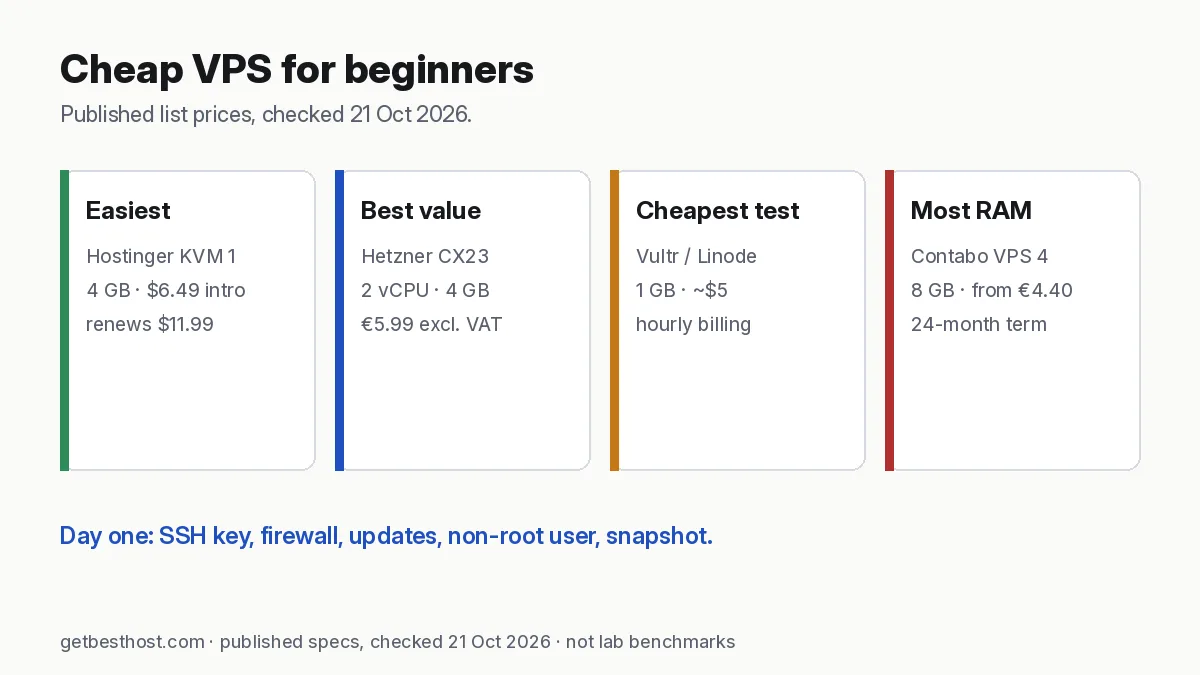
Quick answer: The best cheap VPS for most beginners is Hostinger VPS KVM 1 ($6.49/mo intro, renews $11.99; 4 GB RAM, templates, weekly backups) because it removes most of the Linux setup. If you are comfortable with a terminal, Hetzner CX23 (€5.99/mo excl. VAT, 2 vCPU, 4 GB) is the best value, Vultr and Akamai/Linode start at about $5/mo for 1 GB, DigitalOcean at $6/mo, and Contabo gives 8 GB RAM from €4.40/mo on a 24-month term. Prices are published list prices checked 21 Oct 2026.
Prices below are published list prices from each provider's official pricing page, checked 21 October 2026 (Asia/Dhaka). They are not GetBestHost benchmarks. Some links are affiliate links (disclosure).
The shortlist
| Provider & plan | RAM / vCPU / disk | Price | Billing | Best for beginners who… |
|---|---|---|---|---|
| Hostinger VPS KVM 1 | 4 GB / 1 / 50 GB NVMe | $6.49/mo intro, renews $11.99 | Prepaid term | want templates, a simple panel and weekly backups |
| Hetzner CX23 | 4 GB / 2 / 40 GB NVMe | €5.99/mo excl. VAT | Hourly, monthly cap | can use a terminal and want the best value |
| Vultr Regular 1 GB | 1 GB / 1 / 25 GB | $5/mo | Hourly, monthly cap | want many Asia regions to test |
| Akamai (Linode) 1 GB | 1 GB / 1 | $0.0075/hr (~$5/mo) | Hourly | like simple, well-documented clouds |
| DigitalOcean 1 GB | 1 GB / 1 / 25 GB | $6/mo | Per-second, monthly cap | learn from tutorials (DigitalOcean's are excellent) |
| Contabo Cloud VPS 4 | 8 GB / 4 / 100 GB SSD | from €4.40/mo (24-month term) | Monthly/term | need lots of RAM on a tiny budget |
| DreamHost VPS Stack 4 | 4 GB / 2 / 75 GB NVMe | $6.99/mo first year, renews $11.99 | 12-month term | want a US-based host with full root access and a clear renewal price |
Want a personalised pick? Use the VPS size calculator or the find my host quiz.
What "cheap" really means on a VPS
There are three ways a cheap VPS can end up expensive:
- Renewal jumps. Hostinger's intro prices apply to the first prepaid term; KVM 1 renews at $11.99/mo. Cloud providers like Hetzner, Vultr, DigitalOcean and Linode charge the same rate every month, with no promo.
- Paid extras. Automated backups cost extra at DigitalOcean and Vultr (a percentage of the server price); snapshots, extra IPs and block storage add up. Hostinger includes weekly backups.
- Your time. A $5 server that takes you a weekend to secure is not cheaper than a $7 server with a template that works in 10 minutes, if your time matters.
Our true cost calculator shows the 1–5 year totals including renewal (tick "Include VPS plans").
What you can run on each size
| RAM | Realistic beginner projects |
|---|---|
| 1 GB (+ swap) | Discord/Telegram bot, personal VPN (WireGuard), static site, tiny API agent |
| 2 GB | Small WordPress site with caching, Uptime Kuma, a Node/Python app |
| 4 GB | AI agent such as OpenClaw with browser tools, n8n for personal use, WordPress plus staging |
| 8 GB | n8n + PostgreSQL + agent + reverse proxy, several Docker apps, small local LLM tests |
More detail: best VPS for Discord and Telegram bots · n8n VPS requirements · best VPS for AI agents.
Managed vs unmanaged: which do beginners need?
Every plan above is unmanaged: the provider keeps the hardware and network running, you look after the operating system and apps. Hostinger narrows the gap with app templates, a browser terminal and an AI helper in its panel. If you want a fully managed experience for WordPress, a managed cloud such as Cloudways (from about $11/mo) runs the server for you on DigitalOcean, Vultr and other clouds. If you only need a website, read VPS vs shared hosting first—shared hosting may be enough.
Your first hour on a new VPS
- Pick Ubuntu 24.04 LTS (most tutorials target it) and a region near your users—Singapore for Bangladesh and South Asia (test latency).
- Add an SSH key during creation. On Windows:
ssh-keygen -t ed25519in PowerShell, then paste the.pubfile contents. - Update:
apt update && apt upgrade -y, thenapt install unattended-upgrades. - Create a normal user:
adduser me && usermod -aG sudo me, log in as that user from now on. - Firewall: enable the provider's cloud firewall (allow 22, and 80/443 only if you host a website), or
ufw allow OpenSSH && ufw enable. - Disable password login in
/etc/ssh/sshd_config(PasswordAuthentication no) after your key works. - Swap on 1–2 GB servers:
fallocate -l 2G /swapfile && chmod 600 /swapfile && mkswap /swapfile && swapon /swapfile. - Snapshot the clean server so you can roll back mistakes.
Common beginner mistakes
- Opening every port "to make it work". Open only what you need and put admin panels behind an SSH tunnel or VPN.
- Running everything as root. One bad script then has full control.
- No backups. Snapshots are cheap insurance; also copy important data off the server.
- Buying the biggest plan first. Start small with hourly billing; resizing up is usually a reboot away.
- Forgetting the bill. Delete test servers—stopped servers can still be billed at hourly providers.
Our verdict
- Easiest: Hostinger VPS KVM 1 — read the Hostinger VPS review.
- Best value if you can use a terminal: Hetzner CX23.
- Cheapest way to test regions: Vultr or Akamai/Linode.
- Best tutorials: DigitalOcean.
- Most RAM per euro: Contabo — see Hetzner vs Contabo.