
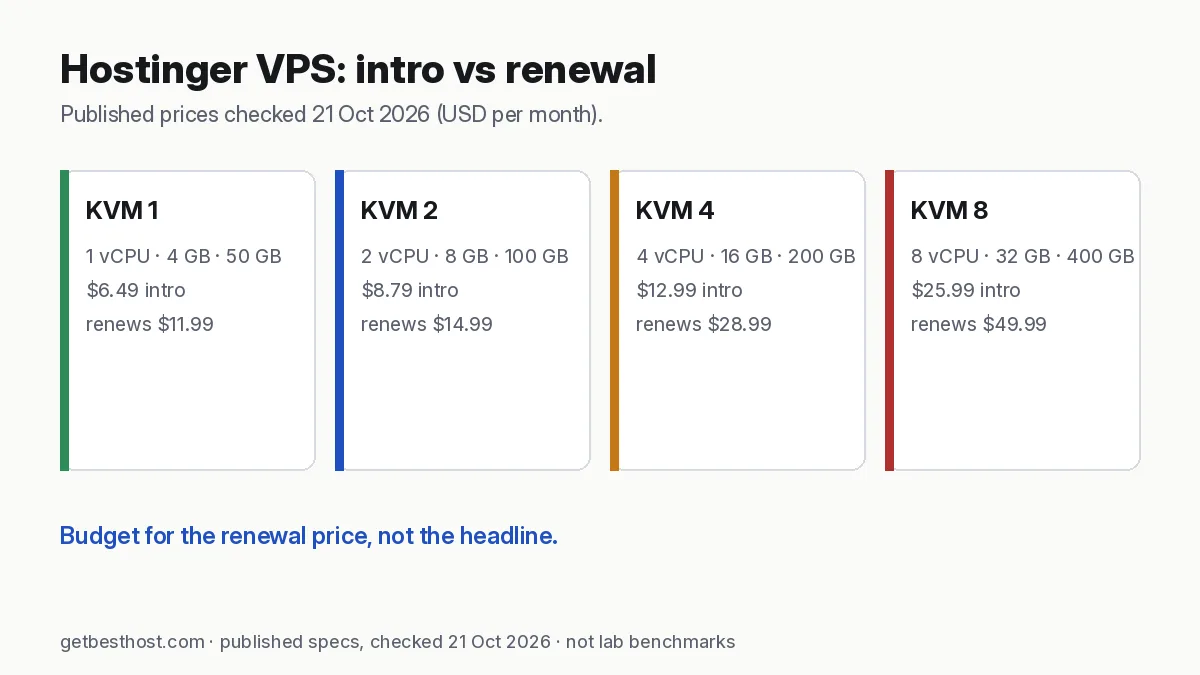
Quick answer: Hostinger VPS is the easiest VPS for beginners we've looked at. Every KVM plan uses AMD EPYC CPUs and NVMe storage, includes weekly backups and a dedicated IP, and has one-click templates for OpenClaw, n8n, Dify, Docker and more. Intro prices on 21 Oct 2026 were $6.49 (KVM 1, 4 GB), $8.79 (KVM 2, 8 GB), $12.99 (KVM 4, 16 GB) and $25.99/mo (KVM 8, 32 GB). They renew at $11.99, $14.99, $28.99 and $49.99/mo. Choose it for convenience. Choose Hetzner or Contabo if you only care about the lowest long-term price.
Review basis: published plan pages, checked 21 October 2026 (Asia/Dhaka). These are published specs, not our lab tests. We have not yet benchmarked Hostinger VPS. Read our methodology. Links marked "Visit" are affiliate links (disclosure).
Verdict
Score: 8.4/10 (editorial). Hostinger has turned the VPS from a blank Linux box into something close to app hosting. You pick a template (OpenClaw, n8n, Dify, WordPress, Docker), and the panel handles the server setup. Intro pricing is competitive and backups are included. The main catch is the usual Hostinger one: renewals cost much more, and billing is prepaid, not hourly.
Plans and prices
| Plan | vCPU | RAM | NVMe | Bandwidth | Intro price | Renews at |
|---|---|---|---|---|---|---|
| KVM 1 | 1 | 4 GB | 50 GB | 4 TB | $6.49/mo | $11.99/mo |
| KVM 2 | 2 | 8 GB | 100 GB | 8 TB | $8.79/mo | $14.99/mo |
| KVM 4 | 4 | 16 GB | 200 GB | 16 TB | $12.99/mo | $28.99/mo |
| KVM 8 | 8 | 32 GB | 400 GB | 32 TB | $25.99/mo | $49.99/mo |
Intro prices require a prepaid term. Check the term length and local taxes at checkout.
What you get on every plan
- AMD EPYC CPUs and NVMe SSD storage
- Free weekly backups, plus manual snapshots
- Dedicated IPv4 and IPv6, full root access
- One-click templates: OpenClaw, n8n, Dify, Agent Zero, Docker/Traefik stacks, plus OS-only images and panels
- An AI assistant in the panel for server commands, and a browser terminal
- Malware scanning and a firewall manager
- 30-day money-back guarantee (check the terms)
Who it's for
Good fit:
- First-time VPS users moving up from shared hosting
- AI agent and automation builders who want OpenClaw or n8n running in minutes
- Agencies hosting several WordPress sites with a free panel
- Users in South and Southeast Asia, thanks to Asian data centers
Not ideal:
- Developers who spin servers up and down by the hour. Hetzner, Vultr and DigitalOcean bill hourly.
- Anyone optimizing purely for long-term cost. Contabo and Hetzner are cheaper after renewal.
- Teams needing GPUs. Hostinger VPS is CPU-only.
Pros and cons
| Pros | Cons |
|---|---|
| Easiest setup with AI and automation templates | Renewal prices 1.7–2.2× intro |
| Weekly backups included | Prepaid terms, no hourly billing |
| Generous RAM at intro prices (4 GB entry) | Entry KVM 1 has a single vCPU |
| NVMe and AMD EPYC across the range | No GPU plans |
| Beginner-friendly panel and AI helper | Fewer cloud extras (load balancers, managed DBs) than DigitalOcean |
What renewal really costs over 3 years
The intro price applies to the first prepaid term (24 months on the page we checked). Year three is billed at the renewal rate:
| Plan | Months 1–24 (intro) | Months 25–36 (renewal) | 3-year total | Average/month |
|---|---|---|---|---|
| KVM 1 | 24 × $6.49 = $155.76 | 12 × $11.99 = $143.88 | $299.64 | $8.32 |
| KVM 2 | 24 × $8.79 = $210.96 | 12 × $14.99 = $179.88 | $390.84 | $10.86 |
| KVM 4 | 24 × $12.99 = $311.76 | 12 × $28.99 = $347.88 | $659.64 | $18.32 |
| KVM 8 | 24 × $25.99 = $623.76 | 12 × $49.99 = $599.88 | $1,223.64 | $33.99 |
Our arithmetic on published prices; taxes excluded. Model other plans in the true cost calculator (tick "Include VPS plans").
For comparison, Hetzner's CX23 (2 vCPU, 4 GB) at €5.99/mo flat comes to about €216 over the same three years, before VAT. You get no templates or included backups, though, and you manage everything yourself.
Setting up an AI agent or n8n on Hostinger VPS
- Choose KVM 1 for a single API-based agent, or KVM 2 for an agent plus n8n.
- During setup, pick a data center close to you. For Bangladesh and South Asia, pick an Asian location (why location matters).
- Choose the OpenClaw or n8n template in the OS and app step. Hostinger installs the app with Docker.
- Add your SSH key, then set a strong root password as a fallback.
- Open the app as the template instructions describe. For OpenClaw, keep the gateway private and use an SSH tunnel (our OpenClaw VPS guide).
- Turn on the firewall manager and allow only the ports you need.
- Take a manual snapshot once everything works. Weekly backups continue automatically.
Hostinger VPS vs Hostinger shared and cloud hosting
| Shared (Premium) | Cloud Startup | VPS KVM 2 | |
|---|---|---|---|
| Intro / renewal (checked 21 Oct 2026) | $2.49 / $10.99 | $7.99 / $25.99 | $8.79 / $14.99 |
| Root access | No | No | Yes |
| Runs AI agents, Docker, Node/Python apps | No | No | Yes |
| Server managed for you | Yes | Yes | You (with templates) |
| Best for | Blogs, small sites | Busy WordPress sites | Apps, agents, automation |
Interesting detail: once renewals kick in, KVM 2 renews cheaper than Cloud Startup and gives you root access. For a technical user, it's the better deal. For someone who never wants to touch a server, Cloud or shared hosting is still simpler. See VPS vs shared hosting.
What the specs mean in practice
- vCPU: KVM 1's single vCPU is fine for an agent that waits on APIs. It's tight for WordPress with traffic, or for builds.
- RAM: Hostinger is generous here. 4 GB at the entry level is more than DigitalOcean's or Vultr's similarly priced plans.
- NVMe: fast disk helps databases and Docker image pulls.
- Bandwidth: 4–32 TB per month is far more than most agents or small sites use.
We'll add our own measurements once our VPS test servers are running. Until then, treat this as a spec-based review.
Which plan should you pick?
RAM is usually the limit for agent and automation workloads, not CPU. A practical way to choose:
| Workload | Suggested plan | Why |
|---|---|---|
| One Telegram/Discord bot, a small API, or a personal n8n | KVM 1 (4 GB) | Enough for a single Node.js/Python service plus a small database |
| An AI agent (OpenClaw, Agent Zero) plus n8n plus Postgres, all in Docker | KVM 2 (8 GB) | Room for several containers without swapping; the best value in the line-up |
| The above plus a small local model (7B–8B, 4-bit quantized) with Ollama | KVM 4 (16 GB) | A quantized 7B–8B model needs several GB of RAM on its own; CPU-only inference is slow but usable for light tasks |
| Several agents, larger local models, or many client automations | KVM 8 (32 GB) | Headroom for bigger models or many containers; at this size, compare an hourly GPU instance as well |
If you are unsure, start one size smaller and upgrade from the panel. Upgrading is easier than downgrading. Our VPS calculator adds up RAM per component if you want a number for your own stack, and Ollama VPS requirements explains model sizes in more detail.
Hostinger VPS vs other VPS hosts over 3 years
Same arithmetic for every plan: intro price for the promo term, renewal price after that. Prices from each provider's official page on 21 Oct 2026, excluding tax. USD and EUR prices are shown separately, not converted.
| Plan | vCPU / RAM / disk | Pricing model | 3-year total |
|---|---|---|---|
| Hostinger KVM 1 | 1 / 4 GB / 50 GB NVMe | $6.49 for 24 mo, then $11.99 | $299.64 |
| Hostinger KVM 2 | 2 / 8 GB / 100 GB NVMe | $8.79 for 24 mo, then $14.99 | $390.84 |
| DreamHost VPS Stack 4 | 2 / 4 GB / 75 GB NVMe | $6.99 for 12 mo, then $11.99 | $371.64 |
| Vultr Regular 4 GB | 2 / 4 GB / 80 GB | $20/mo, hourly billing | $720 |
| DigitalOcean 4 GB | 2 / 4 GB / 80 GB | $24/mo, per-second billing | $864 |
| Hetzner CX23 | 2 / 4 GB / 40 GB | €5.99/mo, hourly billing | €215.64 |
| Contabo Cloud VPS 4 | 4 / 8 GB / 100 GB | €4.40/mo on a 24-mo term | €158.40 |
What the table shows:
- Among the USD plans, Hostinger KVM 2 gives the most RAM for the money over three years, as long as you are happy to prepay 24 months.
- Hetzner and Contabo are cheaper still, but they are unmanaged clouds priced in euros (plus VAT where it applies). You get no one-click agent templates, and on Hetzner backups cost extra.
- DigitalOcean and Vultr cost more per GB of RAM, but you can pay by the hour, destroy a server the day you no longer need it, and use their APIs. That flexibility is worth paying for if you run short experiments.
Use the true cost calculator with "Include VPS plans" ticked to change the period.
First 30 minutes: secure the server
A VPS is reachable from the whole internet from the moment it boots. Do these before you install your agent:
- Log in with an SSH key and turn off password login (
PasswordAuthentication noin/etc/ssh/sshd_config, then restart SSH). Add the key in the Hostinger panel or withssh-copy-id. - Create a normal user with sudo and stop logging in as root.
- Turn on a firewall. Allow only SSH (22) and, if you host a site, 80/443. With UFW:
ufw allow OpenSSH && ufw allow 80,443/tcp && ufw enable. Hostinger's panel also has a firewall manager. - Enable automatic security updates (
unattended-upgradeson Ubuntu/Debian). - Do not expose dashboards to the internet. n8n, Ollama (port 11434) and agent web UIs should sit behind a reverse proxy with HTTPS and a login, or be reached through an SSH tunnel.
- Keep API keys in environment files with restricted permissions (
chmod 600 .env), never in a public Git repository.
Backups: weekly is a start, not a plan
Hostinger includes free weekly backups, and you can restore them from the dashboard. A week is a long time for an agent that writes to a database every few minutes, though. Add your own:
- Take a manual snapshot before every big change (OS upgrade, new Docker stack).
- Back up data, not just the server. Dump your database (
pg_dumpormysqldump) and copy your Docker volumes and.envfiles on a schedule. - Send copies off the server with a tool such as restic or rclone to S3-compatible storage or Google Drive. A backup stored on the same VPS does not help if the VPS is lost.
- Test a restore once. A backup you have never restored is a hope, not a backup.
What happens when the promo ends?
On the page we checked, each plan renews at the listed rate "for 2 years". When your intro term ends, you have three options:
- Renew at the renewal price. For KVM 2 that is $14.99/mo, which is still reasonable for 8 GB RAM.
- Ask about current offers before you renew. Hosts sometimes offer existing customers a new term at a lower price. There is no guarantee, but it costs nothing to ask.
- Move. If your stack is in Docker with off-server backups, moving to another VPS is a few hours of work: restore the volumes and the database, then update DNS.
Set a calendar reminder a month before renewal so the decision is yours, not the auto-renew's.
Alternatives
| If you want… | Choose |
|---|---|
| Lowest price-performance, hourly billing | Hetzner (vs Contabo) |
| Maximum RAM per euro | Contabo |
| Polished cloud with great docs | DigitalOcean |
| Many Asia regions and hourly GPUs | Vultr |
| Managed WordPress on cloud servers | Cloudways |
Looking for Hostinger's shared hosting instead? Read our Hostinger review.