
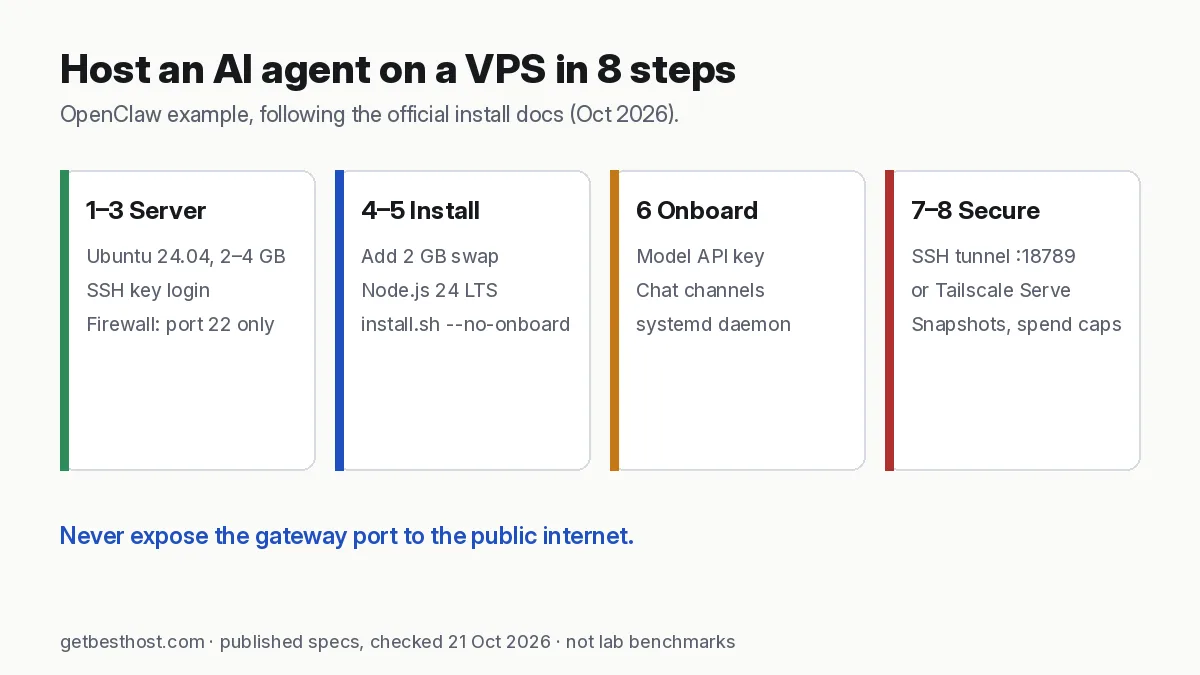
Quick answer: To host an AI agent on a VPS: (1) rent a Linux server with at least 1–2 GB RAM, or 4 GB for comfort, in a region near you; (2) log in with an SSH key and create a non-root user; (3) turn on a firewall that only allows SSH; (4) install Node.js and the agent (OpenClaw uses curl -fsSL https://openclaw.ai/install.sh | bash); (5) run its onboarding to add your model API key and chat channel; (6) keep the agent's control port private and reach it through an SSH tunnel or Tailscale. Add 2 GB of swap on small servers and take a snapshot once it works.
What you are building
An AI agent is a program that runs all the time. It listens on chat channels (Telegram, WhatsApp, Discord, Slack), calls a language model, and uses tools: your calendar, a browser, files, APIs. Your laptop sleeps and your home internet drops, so a small VPS is the usual home for it.
This guide uses OpenClaw, a popular open-source personal agent, as the example. The same steps apply to most Node.js or Python agents and bots. Commands follow OpenClaw's official install docs as of October 2026. Check docs.openclaw.ai for changes before you run them.
Step 1: Choose a server
| Need | Pick | Example plans (list prices, 21 Oct 2026) |
|---|---|---|
| Cheapest that works | 1 GB + swap, API models only | DigitalOcean $6 Droplet, Vultr $5 Regular, Linode 1 GB |
| Recommended | 2–4 GB, 2 vCPU | Hetzner CX23 (4 GB, €5.99), Hostinger KVM 1 (4 GB, $6.49 intro) |
| Agent + n8n + database | 8 GB | Hostinger KVM 2, Contabo Cloud VPS 4/6 |
| One-click install | Provider template | Hostinger VPS and Contabo list OpenClaw images |
Choose Ubuntu 24.04 LTS or Debian 12. For readers in Bangladesh or South Asia, pick a Singapore or Indian region. See best VPS for AI agents for the full comparison.
Step 2: Log in with an SSH key
Add your SSH public key when you create the server. Then connect:
ssh root@YOUR_SERVER_IP
apt update && apt upgrade -y
On Windows, the built-in OpenSSH client works from PowerShell. Generate a key with ssh-keygen -t ed25519 if you don't have one.
Step 3: Firewall first
Use your provider's cloud firewall (Hetzner, DigitalOcean, Vultr and Linode all include one at no charge) and allow only TCP 22. On the server itself:
apt install -y ufw
ufw allow OpenSSH
ufw enable
Do not add a rule for the agent's port (OpenClaw uses 18789). You will reach it through a tunnel.
Step 4: Add swap on small servers
On 1–2 GB servers, swap prevents out-of-memory crashes during installs and big prompts:
fallocate -l 2G /swapfile && chmod 600 /swapfile
mkswap /swapfile && swapon /swapfile
echo '/swapfile none swap sw 0 0' >> /etc/fstab
Step 5: Install Node.js and the agent
OpenClaw needs Node 24.16+ (or 26.1+). The official DigitalOcean guide installs Node 24 LTS and then the agent without running onboarding as root:
curl -fsSL https://deb.nodesource.com/setup_24.x | bash -
apt install -y nodejs
curl -fsSL https://openclaw.ai/install.sh | bash -s -- --no-onboard
Now create a normal user to own the agent and its data:
adduser openclaw
usermod -aG sudo openclaw
loginctl enable-linger openclaw
su - openclaw
openclaw --version
enable-linger lets the user's service keep running after you log out.
Step 6: Onboard: model key, channels, daemon
openclaw onboard --install-daemon
The wizard asks for your model provider (Anthropic, OpenAI, Google and others), your chat channels, and a gateway token. It then installs a systemd user service, so the agent restarts after reboots. Check it:
openclaw status
systemctl --user status openclaw-gateway.service
journalctl --user -u openclaw-gateway.service -f
Step 7: Open the dashboard safely
The gateway binds to localhost by default. From your own computer, open a tunnel:
ssh -N -L 18789:127.0.0.1:18789 openclaw@YOUR_SERVER_IP
Then visit http://127.0.0.1:18789/ and paste the gateway token. As an alternative, install Tailscale on the server and your devices and use Tailscale Serve. That gives you HTTPS access from your phone without opening any public port.
Step 8: Hardening and running costs
- Disable password SSH logins (
PasswordAuthentication noin/etc/ssh/sshd_config) once your key works. - Spending caps: set monthly limits in your model provider's billing page. A looping agent can burn credits overnight.
- Least privilege: give the agent only the accounts and scopes it needs. Use a separate email or calendar where possible.
- Updates:
apt install unattended-upgradesfor the OS. Update the agent regularly and read its changelog. - Snapshots: take one after setup and before every upgrade. DigitalOcean and Vultr charge for backups; Hostinger includes weekly backups.
Typical monthly cost: $5–15 for the server plus your model API usage. API usage is often the bigger number.
Troubleshooting
| Symptom | Likely cause | Fix |
|---|---|---|
| Gateway won't start | Config or Node version | openclaw doctor --non-interactive, check logs |
| "Killed" / OOM | Too little RAM | Add swap, use API models, or upgrade to 2–4 GB |
| Port already in use | Old process | lsof -i :18789, stop it |
| Dashboard won't load | Tunnel not running | Re-open ssh -L and use 127.0.0.1, not the server IP |
Related: n8n VPS requirements · Best VPS for Telegram and Discord bots · Hostinger VPS review