
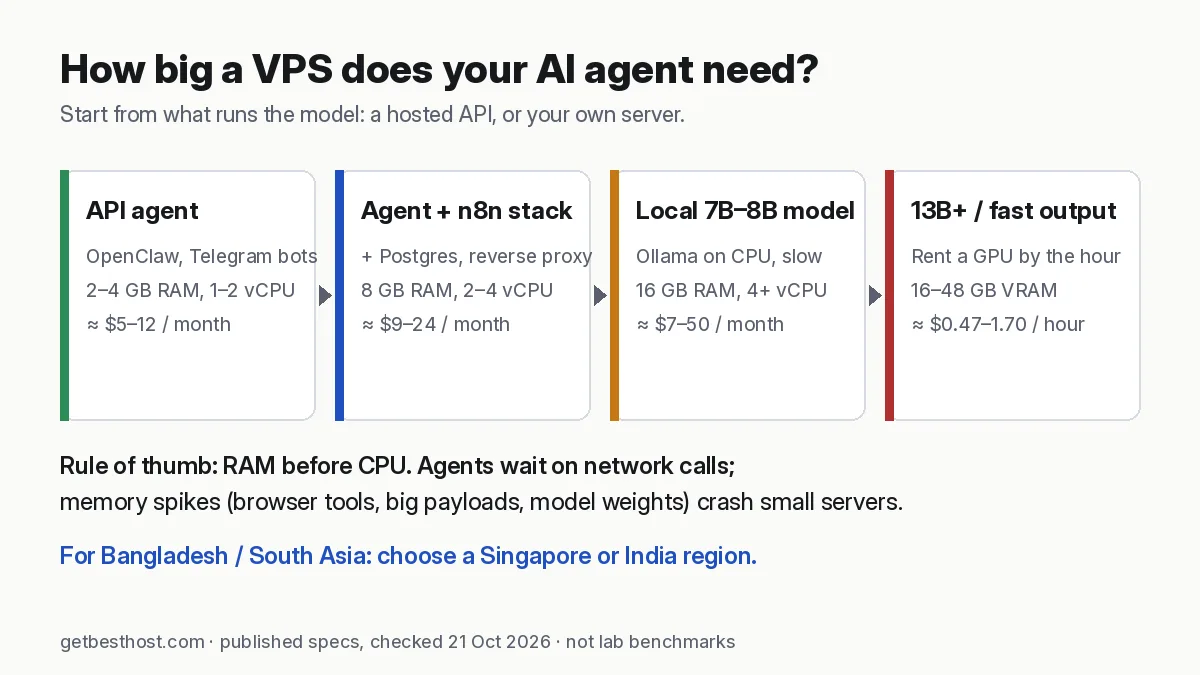
Quick answer: For an AI agent that calls hosted models (Claude, GPT, Gemini) through an API, a 2–4 GB RAM VPS is enough. Good starting points are Hostinger KVM 1 (4 GB, from $6.49/mo intro), Hetzner CX23 (4 GB, €5.99/mo) or a DigitalOcean $12–24 Droplet. If you also run workflow tools like n8n beside it, start at 8 GB (Hostinger KVM 2, Contabo Cloud VPS 6). Running a local LLM with Ollama on a CPU-only VPS needs 16 GB+ and is still slow, so for anything above small 7B–8B models you need a GPU cloud billed by the hour. Prices below are published list prices checked on 21 Oct 2026, not our own benchmarks.
Who this guide is for
AI agents moved from demos to daily tools in 2026. People now run personal assistants like OpenClaw, automation platforms like n8n with AI nodes, Telegram and Discord bots built with LangChain, and local models through Ollama. All of them share one need. They must stay online when your laptop is closed.
A VPS (virtual private server) is the cheapest way to get that. This guide explains how big a server you actually need, which providers fit which job, and what the plans cost on the day we checked them.
How we wrote this: every price and spec below comes from the provider's official pricing page, checked on 21 October 2026 (Asia/Dhaka). These are published specs, not GetBestHost lab benchmarks. We do not yet run our own test servers for these hosts (see how we rate hosts). Prices change often, so confirm at checkout. Some links are affiliate links; see our disclosure.
First decision: API agent or local model?
This one choice decides most of your budget.
1. API-based agents. The "brain" is a hosted model (Claude, GPT, Gemini, DeepSeek, etc.). Your VPS only runs the agent's code: the gateway, the message channels, a small database, maybe a headless browser. CPU and RAM needs are modest. OpenClaw's own DigitalOcean guide runs the gateway on a 1 GB / 1 vCPU Droplet with 2 GB of swap. It recommends API models because "local LLM inference does not fit in 1 GB". (Building OpenClaw's Docker image from source needs about 6 GB; the pre-built image avoids that.)
2. Local-model agents. The model runs on your server, usually through Ollama or llama.cpp. You stop paying per token, but now the server must hold the whole model in memory. On CPU-only VPS plans, answers come out slowly. This path only makes sense with lots of RAM, or with a GPU.
Most readers should start with an API agent on a small VPS. Later they can add a local model for private or bulk tasks.
How much VPS do you need? Sizing rules
| Workload | Practical minimum | Comfortable | Notes |
|---|---|---|---|
| One API agent (OpenClaw, LangChain bot) | 1 GB RAM + 2 GB swap, 1 vCPU | 2–4 GB, 2 vCPU | A browser tool (Chromium) adds several hundred MB |
| n8n (personal, SQLite) | 2 GB | 4 GB, 2 vCPU | n8n's docs say memory matters more than CPU; Code nodes and big payloads raise it |
| Agent + n8n + Postgres + reverse proxy | 4 GB | 8 GB, 2–4 vCPU | The typical "AI automation stack" |
| Ollama, 7B–8B model (quantized) | 8 GB | 16 GB, 4+ vCPU | CPU-only output is slow |
| Ollama, 13B–14B model | 16 GB | 24–32 GB | Consider a GPU instead |
| 30B+ models, fine-tuning, many users | — | GPU cloud | Rent by the hour, shut down when idle |
Two rules of thumb carry most of the weight:
- RAM before CPU. Agents and n8n spend most of their time waiting on network calls. Memory spikes, from big JSON payloads, browser automation and model weights, are what crash small servers.
- NVMe disk and backups matter more than "unlimited" claims. Model files are several GB each, and Docker images add up quickly. Make sure you can snapshot the server before upgrades.
Quick comparison: verified prices (21 Oct 2026)
| Provider | Entry plan that fits agents | RAM / vCPU / disk | Published price | Billing | Asia regions |
|---|---|---|---|---|---|
| Hostinger VPS | KVM 1 | 4 GB / 1 / 50 GB NVMe | $6.49/mo intro, renews $11.99/mo | Prepaid term | Yes (Asia sites incl. Jakarta; 10 locations listed) |
| Hostinger VPS | KVM 2 | 8 GB / 2 / 100 GB NVMe | $8.79/mo intro, renews $14.99/mo | Prepaid term | — |
| Hetzner Cloud | CX23 (Cost-Optimized) | 4 GB / 2 / 40 GB NVMe | €5.99/mo excl. VAT (hourly cap) | Hourly, monthly cap | Singapore |
| Contabo | Cloud VPS 4 | 8 GB / 4 / 100 GB SSD | from €4.40/mo (24-month term) | Monthly/term | Singapore, Japan, India and others |
| Contabo | Cloud VPS 6 | 12 GB / 6 / 100 GB NVMe or 200 GB SSD | from €6.00/mo (24-month term) | Monthly/term | — |
| DigitalOcean | Basic Droplet | 2 GB / 1 / 50 GB · 4 GB / 2 / 80 GB | $12/mo · $24/mo | Per-second, monthly cap | Singapore, Bangalore |
| Vultr | Cloud Compute (Regular) | 2 GB / 1 / 55 GB · 4 GB / 2 / 80 GB | $10/mo · $20/mo | Hourly, monthly cap | Singapore, Mumbai, Bangalore, Delhi, Tokyo, Seoul |
| Akamai (Linode) | Shared 1 GB | 1 GB / 1 | $0.0075/hr (~$5/mo) | Hourly | Singapore, Mumbai, Chennai, Jakarta, Osaka |
Region lists are taken from each provider's site and can change. Hetzner prices exclude VAT, and its Cost-Optimized stock is limited according to Hetzner. Contabo's page shows prices for a 24-month term; shorter terms cost more.
The best VPS options for AI agents, by use case
Hostinger VPS: easiest for beginners (OpenClaw and n8n templates)
Hostinger's VPS page lists one-click templates for OpenClaw, n8n, Dify, Agent Zero and Docker with Traefik, plus an AI web terminal. All plans use AMD EPYC CPUs and NVMe storage and include free weekly backups. If you have never set up a Linux server, this is the shortest path to a working agent.
- Pick: KVM 2 (8 GB) if you plan to run n8n next to your agent. KVM 1 (4 GB) is enough for a single API agent.
- Watch: the low prices are intro rates for a prepaid term. Renewals are $11.99 (KVM 1) and $14.99 (KVM 2) per month. Budget for the renewal, not the headline.
- Visit Hostinger VPS · Hostinger shared hosting review
Hetzner Cloud: best price-performance for developers
Hetzner is the developer favourite in Europe. Its servers have hourly billing with a monthly cap, a clean API and CLI, firewalls at no extra cost, and 20 TB of included traffic in EU locations. It has also run a Singapore location since 2024. OpenClaw's docs include a dedicated Hetzner install guide.
- Pick: CX23 (2 vCPU, 4 GB) for API agents. Step up to a larger shared or dedicated-vCPU plan for n8n with Postgres.
- Watch: there is no managed support for your apps, and Cost-Optimized plans can be out of stock. Verification at signup can be strict.
- Visit Hetzner · Hetzner vs Contabo
Contabo: most RAM per euro (good for local models on a budget)
Contabo's entry Cloud VPS has 4 vCPU and 8 GB RAM for about the price of other providers' 1–2 GB plans. It also lists one-click OpenClaw and n8n images. If you want to try Ollama with a 7B model without paying for a GPU, this is the cheapest way to get enough RAM.
- Pick: Cloud VPS 6 (12 GB) or Cloud VPS 8 (24 GB) for local models.
- Watch: the entry plan has a 200 Mbit/s port, and Contabo positions this "Core" line as "proven hardware" for lighter workloads. Expect less consistent CPU than Hetzner or DigitalOcean.
- Visit Contabo
DigitalOcean: most predictable for production bots
DigitalOcean Droplets are simple, well documented and billed per second (with a 60-second minimum) up to a monthly cap. That is ideal if you spin servers up and down. Its tutorials are among the best on the web, and it has Singapore and Bangalore regions.
- Pick: the $12 (2 GB) Droplet for a single agent, or $24 (4 GB / 2 vCPU) for agent plus n8n.
- Watch: you pay more per GB of RAM than at Hetzner or Contabo, and backups cost extra (20–30% of the Droplet price).
- Visit DigitalOcean
Vultr: widest Asia coverage, plus hourly GPUs
Vultr has the most regions in South and East Asia, including Mumbai, Bangalore, Delhi, Singapore, Tokyo and Seoul. It also rents cloud GPUs by the hour. On the pricing page we checked, an NVIDIA A16 slice with 16 GB of GPU memory started at $0.471/hour, and an L40S (48 GB) at $1.671/GPU/hour. That makes Vultr a natural home for a CPU agent server plus an occasional GPU box for local models.
- Pick: Regular Cloud Compute, $10 (2 GB) or $20 (4 GB), for agents. Use a GPU instance only while you need it.
- Visit Vultr
Local LLMs on a VPS: what is realistic
Ollama makes running open models easy: ollama run llama3.1:8b downloads and serves a quantized model. The catch is memory and speed. Ollama's README has long advised at least 8 GB of RAM for 7B models, 16 GB for 13B and 32 GB for 33B. On a CPU-only VPS, even an 8B model produces text slowly. That is fine for summarizing emails overnight, but painful for live chat.
A practical hybrid most builders end up with:
- Run the agent, n8n and the database on a cheap 4–8 GB VPS that stays on 24/7.
- Send everyday reasoning to a hosted API model, paying per token.
- Run private or bulk jobs through Ollama, either on a large-RAM Contabo VPS or on an hourly GPU instance that you shut down afterwards.
Our Ollama VPS requirements guide has the model-by-model RAM table.
Latency: Bangladesh, India and South Asia
An agent that replies on Telegram or WhatsApp feels faster when the server is near you and near the API provider. For users in Bangladesh, Singapore is the default choice; every provider in this guide offers it. Indian regions (Mumbai, Bangalore, Delhi, Chennai) can be closer or slower depending on your ISP's international routes. Test with ping and mtr from your own connection before you commit. Hourly-billed providers (Hetzner, DigitalOcean, Vultr, Linode) let you try several regions for a few cents.
Agents don't need BDIX hosting. BDIX speeds up traffic inside Bangladesh, but your agent mostly talks to model APIs hosted abroad. See our guide on VPS vs shared hosting if you're also hosting a website.
Security checklist before you go live
AI agents hold powerful keys: your email, calendar, API billing. Treat the VPS like a production server:
- Log in with SSH keys and disable password logins.
- Keep the agent's gateway port private. OpenClaw's docs warn not to expose it directly to the internet. Use an SSH tunnel or Tailscale.
- Store API keys in environment variables or a secrets file with
chmod 600, never in a public repository. - Turn on the provider's firewall and allow only ports 22, 80 and 443 as needed.
- Run the agent as a non-root user, and enable automatic security updates.
- Set spending limits on your model API accounts. Agents can loop.
- Take a snapshot before every major upgrade.
Our picks in one line each
- Never used Linux: Hostinger VPS KVM 1 or KVM 2 with the OpenClaw or n8n template.
- Best value for developers: Hetzner CX23 in Singapore or the EU.
- Most RAM for local models on a budget: Contabo Cloud VPS 6/8.
- Production bots with clean hourly billing: DigitalOcean $12–24 Droplets.
- Asia coverage plus GPU by the hour: Vultr.
Next steps: How to run OpenClaw on a VPS · n8n VPS requirements · Best VPS for Discord and Telegram bots.