
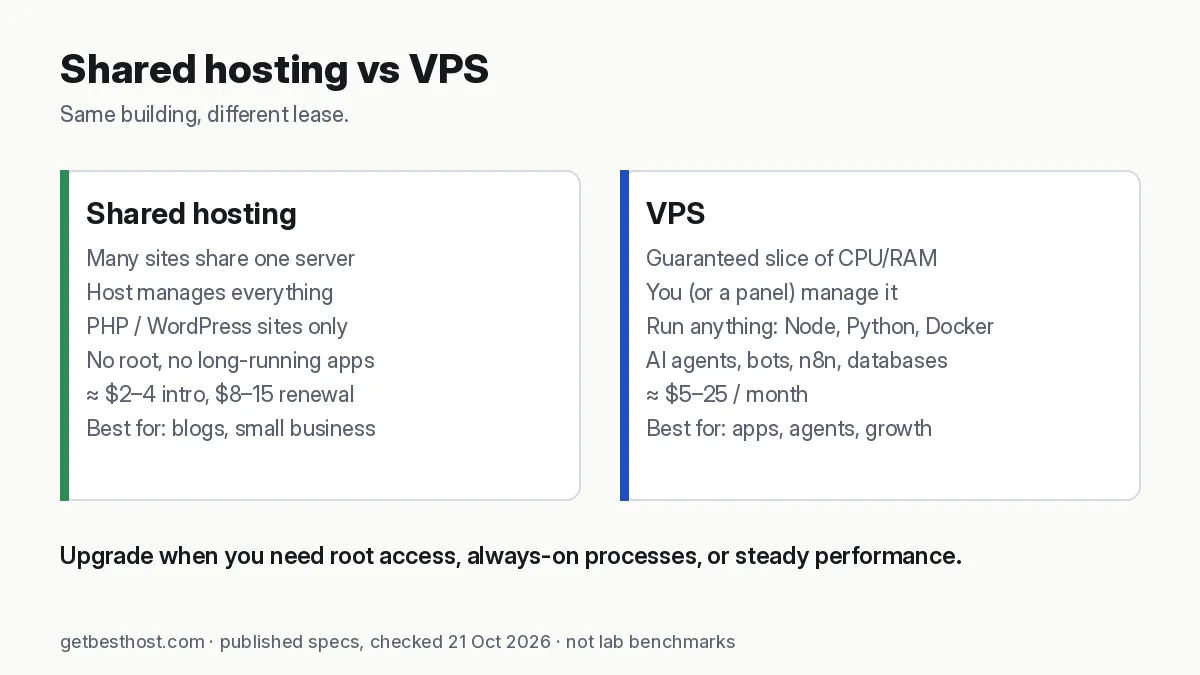
Quick answer: Choose shared hosting for a normal WordPress blog, portfolio or small business site. It is cheaper (often $2–4/mo intro, $8–15/mo renewal), the host handles the server, and it is enough for thousands of visitors a day with caching. Choose a VPS when you need root access, always-on apps (AI agents, bots, n8n, Node or Python), steady performance under traffic spikes, or isolation from noisy neighbours. Unmanaged VPS plans start around $5–7/mo, but you, or a panel like Cloudways, must manage security and updates.
The difference in one picture
Shared hosting is like renting a desk in a co-working space. It's cheap, the building is managed for you, and you live with the neighbours. A VPS is like renting a private office in the same building. You get your own locked room with guaranteed space, but you set up the furniture.
Side-by-side comparison
| Shared hosting | VPS (unmanaged) | Managed cloud (e.g. Cloudways) | |
|---|---|---|---|
| Typical price | $2–4/mo intro, $8–15 renewal | $5–25/mo, flatter renewals | from about $11–14/mo |
| Resources | Shared, soft limits | Reserved vCPU/RAM | Reserved, on a cloud VM |
| Root access | No | Yes | Limited |
| Who patches the server | Host | You | Provider |
| Runs Node, Python, Docker, AI agents | Rarely | Yes | Partly (PHP apps mainly) |
| Email included | Usually | No, add your own | Add-on |
| Best for | Blogs, brochure sites, first store | Apps, bots, agents, developers | Growing WordPress/WooCommerce |
When shared hosting is the right choice
- You run WordPress, a portfolio or a small business site.
- You want email, SSL, backups and a one-click installer in one dashboard.
- You don't want to learn Linux.
- Your traffic is modest. With page caching and a CDN, a well-built WordPress site on a good shared plan can serve tens of thousands of monthly visits.
Our shared-hosting picks are in best web hosting and cheap hosting. Watch renewals: the price on the homepage is usually an intro rate for a multi-year prepay.
When you need a VPS
- Always-on processes: AI agents (OpenClaw on a VPS), Telegram/Discord bots, n8n, queue workers, cron-heavy jobs.
- Custom software: Node.js, Python, Go, Docker, databases you tune yourself.
- Steady performance: traffic spikes, WooCommerce stores with many logged-in users, or neighbours slowing you down.
- Isolation and compliance: you want your own IP and full control over what runs.
Real 3-year cost: shared vs VPS
Using published prices checked 21 Oct 2026 (intro × promo months + renewal × remaining months):
| Option | Intro → renewal | 3-year total |
|---|---|---|
| Hostinger Premium (shared, 48-mo promo) | $2.49 → $10.99 | $89.64 |
| Bluehost Starter (shared, 36-mo promo) | $3.99 → $9.99 | $143.64 |
| SiteGround StartUp (shared, 12-mo promo) | $2.99 → $17.99 | $467.64 |
| Hostinger VPS KVM 1 (24-mo promo) | $6.49 → $11.99 | $299.64 |
| Vultr 2 GB VPS (no promo) | $10 flat | $360.00 |
| Hetzner CX23 VPS (no promo, excl. VAT) | €5.99 flat | €215.64 |
| Cloudways 1 GB (managed cloud) | $11 flat | $396.00 |
Two surprises: a flat-priced VPS can cost less over three years than a shared plan with a short promo, and renewal terms matter more than the hosting type. Run your own numbers in the true cost calculator or size a server with the VPS calculator.
The hidden costs of a VPS
The server price is not the whole bill:
- Your time: security updates, firewall, backups, monitoring.
- Backups: often 20–30% extra at DigitalOcean and Vultr. Hostinger VPS includes weekly backups.
- Control panel: free options exist (CloudPanel, HestiaCP), but cPanel licences cost extra.
- Email: a VPS has no mailbox service by default. Use a separate email host.
If that list sounds like work you'd rather skip, managed cloud hosting such as Cloudways sits between the two.
What "shared" really limits
Shared hosting is rarely limited by disk space. It is limited by rules you only see in the small print or in the control panel:
| Limit | What it means | Example from an official spec page |
|---|---|---|
| Inodes | Total number of files and folders, including emails and cache files | Namecheap Stellar: 300,000; Hostinger Cloud Startup: 2,000,000 |
| PHP workers | How many uncached PHP requests can run at the same time | Hostinger Cloud Startup: 100 |
| CPU / RAM share | Your slice of the server; going over it causes slowdowns or 503/508 errors | Often listed only inside the control panel |
| Entry processes | Simultaneous connections to PHP scripts | Usually in the host's acceptable use or plan details |
| Websites per plan | How many separate sites you can host | Namecheap Stellar: 3; InMotion Launch: 2 |
Figures from the providers' official plan pages, checked 21 Oct 2026.
A cached blog almost never hits these limits. A WooCommerce store, a membership site or a site with a heavy page builder can hit the PHP worker and CPU limits well before it runs out of storage. That is the real signal that you need more than shared hosting.
The middle option: cloud hosting
Between shared hosting and a VPS sits "cloud hosting": you keep an easy control panel, email and managed updates, but get far more guaranteed resources. Two examples from our price database:
| Plan | Resources (published) | Price | 3-year total |
|---|---|---|---|
| Hostinger Cloud Startup | 4 CPU cores, 4 GB RAM, 100 GB NVMe | $7.99/mo for 48 months, then $25.99 | $287.64 |
| Cloudways DigitalOcean 1 GB | 1 GB RAM on a cloud server you choose | $11/mo, monthly | $396.00 |
Cloud hosting suits a growing WordPress site or store whose owner does not want to manage Linux. It does not suit custom software: you still cannot run your own Docker containers, a long-running bot or an AI agent on these plans. For that you need a VPS.
Who is responsible for what
The biggest difference between shared hosting and an unmanaged VPS is not speed. It is who fixes things at 2 a.m.
| Task | Shared / cloud hosting | Unmanaged VPS |
|---|---|---|
| Operating system updates and security patches | Host | You |
| Web server, PHP and database updates | Host | You |
| Firewall and brute-force protection | Host (basic) | You |
| SSL certificates | Host (usually automatic) | You (Certbot or a reverse proxy) |
| Email hosting | Usually included | Not included; use a separate provider |
| Backups | Host (check frequency and retention) | You, unless the plan includes them |
| Your site or app code, plugins, themes | You | You |
If you choose a VPS, budget an hour or two a month for maintenance, or choose a VPS with a panel and templates (such as Hostinger VPS) to cut that time.
Best choice by project type
| Project | Best fit | Why |
|---|---|---|
| Personal blog or portfolio | Shared | Cheapest; caching handles the traffic |
| Small business site with email | Shared | Email and SSL included; nothing to administer |
| WooCommerce store with steady sales | Cloud or managed cloud | Guaranteed resources for uncached checkout pages |
| Agency hosting 10+ client sites | Cloud, managed cloud or a VPS with a panel | Isolation between clients; more PHP workers |
| Telegram/Discord bot, API or n8n | VPS | Needs a process running 24/7, which shared hosting does not allow |
| AI agent (OpenClaw, Agent Zero) or local model | VPS with 8 GB+ RAM | Docker, root access and RAM; see best VPS for AI agents |
| SaaS app in Node.js, Python or Go | VPS or developer cloud | Full control over the runtime |
Still not sure? The find my host quiz asks five questions and points you to a type of hosting and a plan.
How to decide in 60 seconds
- Is it a WordPress or PHP site with fewer than ~50k visits a month? Shared hosting.
- Does it need a process running 24/7, or software shared hosts block? VPS.
- Is it a growing WordPress or WooCommerce business, and you don't want to admin servers? Managed cloud.
- Unsure? Start shared. Moving to a VPS later is a routine migration.
For VPS providers, see best VPS for AI agents and Hetzner vs Contabo.
Signs you have outgrown shared hosting
- Your host emails you about CPU or "entry process" limits, or the site returns 503/508 errors at busy times.
- The admin area is slow even with caching enabled, while the front end is fast. This often means PHP workers are exhausted.
- You need software shared hosting cannot run: Node.js or Python apps, Docker, n8n, an AI agent, a bot, Redis.
- A store's checkout slows down during sales. Uncached requests do not benefit from page caching.
If only the first two apply and you run WordPress, a step up to managed cloud (for example Cloudways) gives you dedicated resources without learning server administration. If you need to run your own software, you need a VPS.
Moving from shared hosting to a VPS
- Pick the region closest to your visitors, and test it with the latency test.
- Size it: WordPress alone runs on 2 GB. WordPress plus WooCommerce, or several sites, needs 4 GB. Add 2–4 GB for n8n or agents (VPS calculator).
- Choose a control layer: a panel-based VPS (Hostinger VPS templates), a free server panel, or plain Docker if you are comfortable on the command line.
- Copy the site with a migration plugin or by exporting files and the database. Test it on a temporary URL or with a hosts-file override.
- Lower your DNS TTL a day before, switch the A record, and keep the old hosting for a week as a fallback.
- Set up backups and updates on day one. On an unmanaged VPS, nobody else will.
3-year example with real list prices
At published prices checked 21 Oct 2026: Hostinger Premium shared hosting costs about $89.64 over 36 months (48-month promo). A Hostinger KVM 1 VPS costs about $299.64 ($6.49 for 24 months, then $11.99). A Hetzner CX23 costs about €215.64 with hourly billing and no renewal jump. The VPS costs 2–3× more, and that buys guaranteed RAM, root access and the ability to run agents and apps. See every plan in the comparison matrix.