
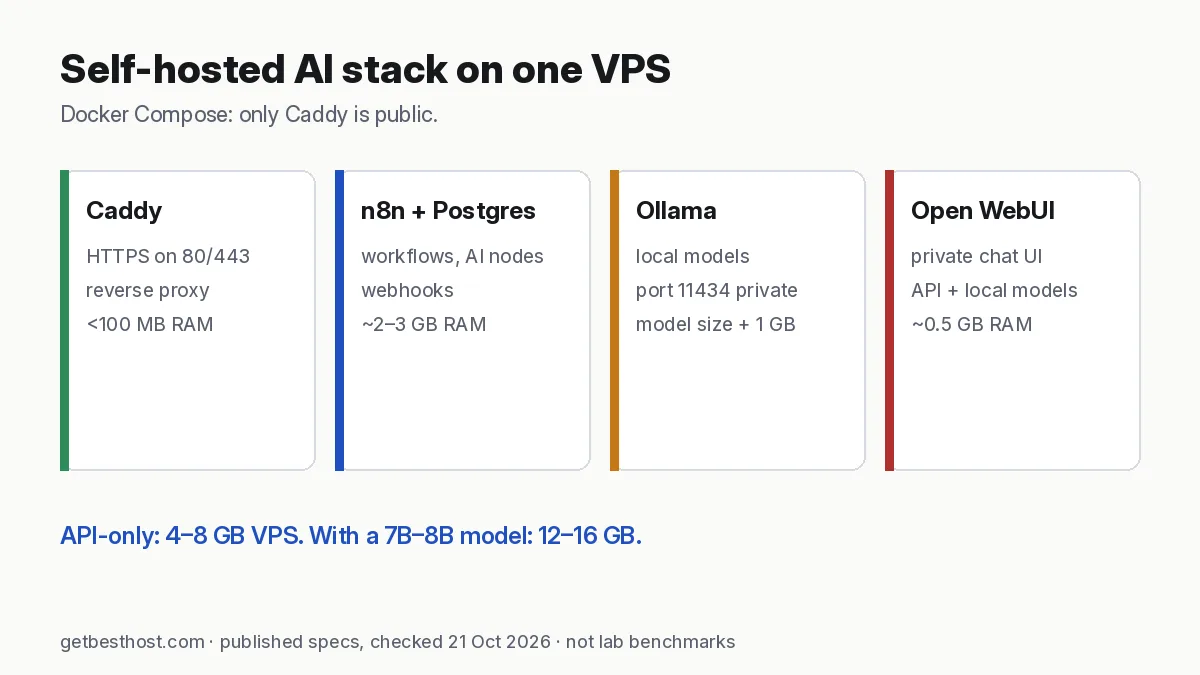
Quick answer: A practical self-hosted AI stack fits on one 8–16 GB VPS: Caddy (automatic HTTPS) in front of n8n (automations and AI agent workflows) backed by PostgreSQL, plus Ollama for local models and Open WebUI as a private chat interface. With API models only, 4–8 GB is enough; add Ollama with a 7B–8B model and plan 12–16 GB. Good-value hosts: Contabo Cloud VPS 6/8 (12–24 GB), Hostinger KVM 2/4 (8–16 GB), Hetzner. Keep Ollama and Postgres off the public internet.
What you are building
| Service | Job | RAM (approx.) | Public? |
|---|---|---|---|
| Caddy | Reverse proxy with automatic Let's Encrypt HTTPS | <100 MB | Yes (80/443) |
| n8n | Workflows, AI agent nodes, webhooks | 0.5–2 GB | Via Caddy |
| PostgreSQL | n8n database | 0.3–1 GB | No |
| Ollama | Runs local models (Llama, Qwen, Mistral…) | model size + ~1 GB | No |
| Open WebUI | ChatGPT-style interface for Ollama and API models | ~0.5 GB | Via Caddy |
Total without local models: about 3–4 GB. With a 4-bit 7B–8B model: about 10–12 GB. That is why we suggest 8 GB for API-only and 16 GB with Ollama (see the VPS calculator).
Pick a server
| Budget | Plan (published prices, 21 Oct 2026) | Fits |
|---|---|---|
| Lowest cost, lots of RAM | Contabo Cloud VPS 6: 6 vCPU / 12 GB, from €6.00/mo (24-mo) | Full stack + 7B model (slow CPU inference) |
| Easiest panel + backups | Hostinger KVM 2: 8 GB, $8.79 intro (renews $14.99) · KVM 4: 16 GB, $12.99 intro (renews $28.99) | API-only (KVM 2) or with Ollama (KVM 4) |
| Developer value | Hetzner CX23: 4 GB, €5.99/mo excl. VAT (scale up for Ollama) | API-only stack |
| Hourly GPU for big models | Vultr A16 16 GB from $0.471/hr | Fast local inference on demand |
Choose Ubuntu 24.04, add an SSH key, and point two DNS records (for example n8n.example.com and chat.example.com) at the server IP. New to servers? Start with cheap VPS for beginners.
The Docker Compose file
Install Docker (curl -fsSL https://get.docker.com | sh), create a folder, and save this as compose.yaml:
services:
  caddy:
    image: caddy:2
    restart: unless-stopped
    ports: ["80:80", "443:443"]
    volumes:
      - ./Caddyfile:/etc/caddy/Caddyfile
      - caddy_data:/data
  postgres:
    image: postgres:16
    restart: unless-stopped
    environment:
      POSTGRES_USER: n8n
      POSTGRES_PASSWORD: ${PG_PASSWORD}
      POSTGRES_DB: n8n
    volumes: [pg_data:/var/lib/postgresql/data]
  n8n:
    image: docker.n8n.io/n8nio/n8n
    restart: unless-stopped
    environment:
      DB_TYPE: postgresdb
      DB_POSTGRESDB_HOST: postgres
      DB_POSTGRESDB_USER: n8n
      DB_POSTGRESDB_PASSWORD: ${PG_PASSWORD}
      DB_POSTGRESDB_DATABASE: n8n
      N8N_HOST: n8n.example.com
      N8N_PROTOCOL: https
      WEBHOOK_URL: https://n8n.example.com/
      N8N_ENCRYPTION_KEY: ${N8N_KEY}
      EXECUTIONS_DATA_PRUNE: "true"
      EXECUTIONS_DATA_MAX_AGE: "168"
    volumes: [n8n_data:/home/node/.n8n]
    depends_on: [postgres]
  ollama:
    image: ollama/ollama
    restart: unless-stopped
    volumes: [ollama:/root/.ollama]
  openwebui:
    image: ghcr.io/open-webui/open-webui:main
    restart: unless-stopped
    environment:
      OLLAMA_BASE_URL: http://ollama:11434
    volumes: [openwebui:/app/backend/data]
    depends_on: [ollama]
volumes: {caddy_data: {}, pg_data: {}, n8n_data: {}, ollama: {}, openwebui: {}}
And a Caddyfile:
n8n.example.com {
  reverse_proxy n8n:5678
}
chat.example.com {
  reverse_proxy openwebui:8080
}
Create .env with PG_PASSWORD= and N8N_KEY= set to long random strings (openssl rand -hex 32), then run docker compose up -d. Pull a model with docker compose exec ollama ollama pull llama3.1:8b. In n8n, use the Ollama credential with base URL http://ollama:11434 to call the local model from AI agent nodes.
Image names and variables follow the projects' official docs as of October 2026; check each project's documentation for changes before deploying.
Security checklist
- Only Caddy publishes ports. Ollama's API has no authentication—never map
11434to the host's public interface. Same for Postgres5432. - Create accounts immediately. The first user to open n8n or Open WebUI becomes the owner/admin—do it right after
docker compose up. - Firewall: allow 22, 80, 443 only. Use SSH keys and disable password login.
- Secrets: keep
.envatchmod 600; never commit it. - Updates:
docker compose pull && docker compose up -dmonthly; read release notes first. - API spending limits on any hosted model provider your agents call.
Backups
- Back up
.env—especiallyN8N_KEY. Without it, n8n cannot decrypt saved credentials after a rebuild. - Dump Postgres nightly:
docker compose exec -T postgres pg_dump -U n8n n8n | gzip > n8n-$(date +%F).sql.gz. - Copy dumps off the server (object storage, Google Drive via rclone, or your PC).
- Take a provider snapshot before upgrades. Hostinger VPS includes weekly backups; DigitalOcean and Vultr charge extra.
Monthly cost examples
| Setup | Server | Approx. monthly |
|---|---|---|
| API-only stack (n8n + Postgres + Open WebUI) | Hetzner CX23 or Hostinger KVM 2 | €5.99 or $8.79 intro + API usage |
| Full stack + 7B local model | Contabo Cloud VPS 6 or Hostinger KVM 4 | from €6.00 or $12.99 intro |
| Full stack + occasional big model | 8 GB VPS + Vultr GPU 2 h/day | VPS + ~$28/mo GPU (A16 at $0.471/hr × 60 h) |
All server prices are published list prices checked 21 Oct 2026; renewals and taxes differ—model them in the true cost calculator.
Related: best VPS for AI agents · Ollama VPS requirements · n8n VPS requirements · host OpenClaw on a VPS.